

Cloud infrastructure makes life easy for IT people. The common task for any IT project is maintaining back-end data.
AWS provides database as service which is commonly known as Relation Database Service (RDS). It has the support of all popular databases like SQL server, MySQL, and PostgresSQL.
AWS RDS provides a built-in service for backup, which is configurable. It takes the snapshot of your entire DB instance and keeps it in AWS infra as a backup. Although this service work fabulously, there are times when you need to have database file natively stored on your machine.
This article will elaborate on the process of creating a .bak file from the AWS RDS SQL server instance.
Login to your AWS console and navigate to RDS, from the side menu locate the link for the options group as shown below
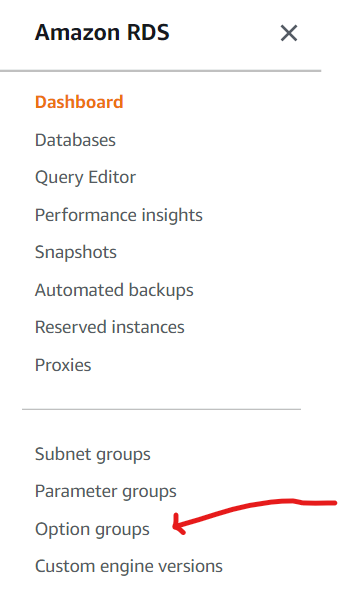
You will be redirected to the page for creating a new option group
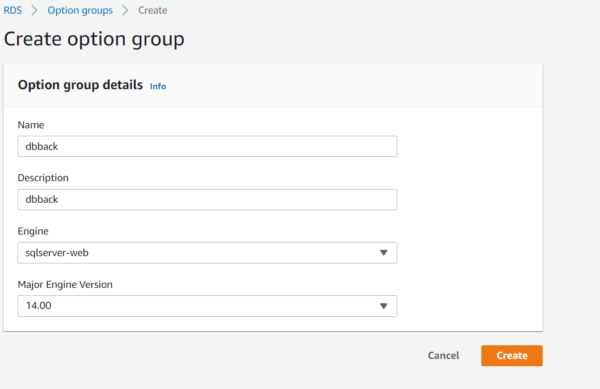
Provide appropriate name and description for option group, its essential to keep and Engine and its number the same as of RDS database.
Once you have created an option-group, you need to add an option you will be redirected to the screen for adding an option
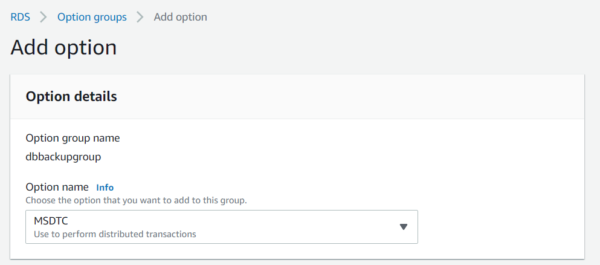
Select Sql server backup restore from the option dropdown

Create a new I am role, AWS will automatically grant access to this role for SQL server backup and restore
you can apply this option group to reflect immediately or at scheduled maintenance time.
For storing the backup file you need to create a bucket in S3 storage. Navigate to S3 storage and add the bucket as shown below
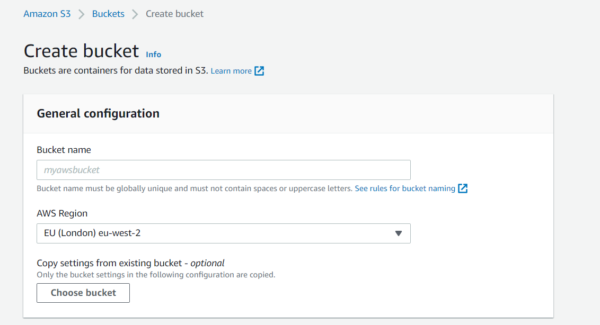
Keep the default settings as it is. Once you are ready with the bucket, All you need to do is to execute the below command on your MMC
exec msdb.dbo.rds_backup_database
@source_db_name=’database_name’,
@s3_arn_to_backup_to=’arn:aws:s3:::bucket_name/file_name.extension’
Replace database_name with the actual database name, and bucket_name with the actual name of the bucket.
Similarly, replace file_name.extension with the name of the file and its extension
It will create a backup file in s3 bucket.
Resource Center
These aren’t just blogs – they’re bite-sized strategies for navigating a fast-moving business world. So pour yourself a cup, settle in, and discover insights that could shape your next big move.
What Are Real-World Use Cases of Agentic AI in Businesses?
Artificial intelligence is evolving rapidly, but one of the most transformative advancements in recent years is Agentic AI. Unlike traditional AI systems that rely heavily on human prompts or [...]
Why Is Agentic AI Considered the Future of Enterprise Automation?
The landscape of enterprise technology is evolving at an unprecedented pace. Organizations are continuously searching for smarter ways to automate processes, improve operational efficiency, and scale innovation without increasing [...]
How Does Agentic AI Automate Complex Business Workflows?
Businesses today operate in increasingly complex digital environments where operations involve multiple systems, approvals, data sources, and decision layers. Managing these interconnected processes manually or with traditional automation tools [...]
